Jak zrobić w openHA...
 
Powiadomienia
Wyczyść wszystko

[Zamknięty] Jak zrobić w openHAB, kilka pytań

51 Wpisów
12 Użytkownicy
2 Reactions
19.8 K Wyświetleń
(@maglo18)
Wpisów: 12
Bywalec
Translate
English
Spanish
French
German
Italian
Portuguese
Russian
Chinese
Japanese
Korean
Arabic
Hindi
Dutch
Polish
Turkish
Vietnamese
Thai
Swedish
Danish
Finnish
Norwegian
Czech
Hungarian
Romanian
Greek
Hebrew
Indonesian
Malay
Ukrainian
Bulgarian
Croatian
Slovak
Slovenian
Serbian
Lithuanian
Latvian
Estonian
 

Jeszcze nie :). A jaka bezę używać? Możesz podać podpowiedź od czego zacząć?


Dodane : 21/02/2019 1:10 pm
adrian
(@adrian)
Wpisów: 4083
Szefu Admin Zasłużony dla Forum, Patron Strony
Translate
English
Spanish
French
German
Italian
Portuguese
Russian
Chinese
Japanese
Korean
Arabic
Hindi
Dutch
Polish
Turkish
Vietnamese
Thai
Swedish
Danish
Finnish
Norwegian
Czech
Hungarian
Romanian
Greek
Hebrew
Indonesian
Malay
Ukrainian
Bulgarian
Croatian
Slovak
Slovenian
Serbian
Lithuanian
Latvian
Estonian
 

no to dopóki nie zacznie zbierać dane w bazie to nic nie będzie Ci się rysować

Lektury:

Ja używam dwóch baz danych: 

  • mapDB - bardzo prosta baza, która tylko zapamiętuje ostatną wartość item. Wykorzystuje do przywracania ostatniej wartości item podczas restartu OH
  • InfluxDB - do wykresów analityki.  Dodatkow InfluxDB + Grafana to dobra kombinacja do wizualizacji jak poniżej

Image result for InfluxDB + Grafana


Dodane : 21/02/2019 1:45 pm
(@lacky)
Wpisów: 20
Praktykant
Translate
English
Spanish
French
German
Italian
Portuguese
Russian
Chinese
Japanese
Korean
Arabic
Hindi
Dutch
Polish
Turkish
Vietnamese
Thai
Swedish
Danish
Finnish
Norwegian
Czech
Hungarian
Romanian
Greek
Hebrew
Indonesian
Malay
Ukrainian
Bulgarian
Croatian
Slovak
Slovenian
Serbian
Lithuanian
Latvian
Estonian
 

Nie chce zakładać nowego tematu a mam pytanie odnośnie nieszczęsnego sonoffa 🙂

Już sobie w końcu poradziłem i działa wszystko, ale nie do końca jestem zadowolony z prezentacji mianowicie w mojej chwilowej przygodzie z HA gdzie zrobiłem sonoffa było tak, że przełącznik miał jakby 3 tryby, on, off, offline i gdy było odłączone zasilanie widziałem, że jest brak łączności i wówczas nie mogłem sterować. w openHab mam Jak w załączniku, da się to jakoś ubrać w "1-dną" linijkę ?

Zależy mi na tym że jak sonoff nie ma prądu to nic nie można zrobić np. linijka cała jest szara. Obecnie widzę że nie ma prądu na 1-dnym, ale mimo wszytko mogę sterować na 2-gim :).

Jakość Wifi mi nie zależy


sonoff

 
Dodane : 08/03/2019 11:05 am
(@marlon)
Wpisów: 136
Pomocny
Translate
English
Spanish
French
German
Italian
Portuguese
Russian
Chinese
Japanese
Korean
Arabic
Hindi
Dutch
Polish
Turkish
Vietnamese
Thai
Swedish
Danish
Finnish
Norwegian
Czech
Hungarian
Romanian
Greek
Hebrew
Indonesian
Malay
Ukrainian
Bulgarian
Croatian
Slovak
Slovenian
Serbian
Lithuanian
Latvian
Estonian
 

Możesz użyć visibility w sitemap żeby schować całkowicie item jeśli ci to odpowiada. 


Dodane : 08/03/2019 1:14 pm
(@lacky)
Wpisów: 20
Praktykant
Translate
English
Spanish
French
German
Italian
Portuguese
Russian
Chinese
Japanese
Korean
Arabic
Hindi
Dutch
Polish
Turkish
Vietnamese
Thai
Swedish
Danish
Finnish
Norwegian
Czech
Hungarian
Romanian
Greek
Hebrew
Indonesian
Malay
Ukrainian
Bulgarian
Croatian
Slovak
Slovenian
Serbian
Lithuanian
Latvian
Estonian
 

Rzeczywiście jest to jakiś pomysł, ale gorzej z wykonaniem załóżmy że mam :

.items

Switch sonoff_lampa "Lampa" {mqtt=">[broker:cmnd/sonoff/POWER:command:*:default],<[broker:stat/sonoff/POWER:state:default]", autoupdate="false"}
Number sonoff_lampa_RSSI "WiFi Sygnał: RSSI [%d %%]" (gRSSI) { mqtt="<[broker:tele/sonoff/STATE:state:JSONPATH($.Wifi.RSSI)]" }
Switch sonoff_lampa1 "Lampa: online" (gReachable) { mqtt="<[broker:tele/sonoff/LWT:state:MAP(reachable.map)]" }

reachable.map

Online=ON
Offline=OFF

sitemaps

Frame label="SonOff"
{
Switch item=sonoff_lampa
Text item=sonoff_lampa_RSSI
Switch item=sonoff_lampa1
}

No to teraz jak to wsadzić do sitemapy ?


Dodane : 08/03/2019 2:13 pm
(@marlon)
Wpisów: 136
Pomocny
Translate
English
Spanish
French
German
Italian
Portuguese
Russian
Chinese
Japanese
Korean
Arabic
Hindi
Dutch
Polish
Turkish
Vietnamese
Thai
Swedish
Danish
Finnish
Norwegian
Czech
Hungarian
Romanian
Greek
Hebrew
Indonesian
Malay
Ukrainian
Bulgarian
Croatian
Slovak
Slovenian
Serbian
Lithuanian
Latvian
Estonian
 

@lacky

Mozesz calkowicie schowac twoj wlacznik jesli sonoff jest offline, uzywajac funkcje visibility

W sitemap popraw jak ponizej

Frame label="SonOff"
{
Switch item=sonoff_lampa visibility=[sonoff_lampa1==ON]
Text item=sonoff_lampa_RSSI
Switch item=sonoff_lampa1
}


Dodane : 10/03/2019 1:09 am
(@lacky)
Wpisów: 20
Praktykant
Translate
English
Spanish
French
German
Italian
Portuguese
Russian
Chinese
Japanese
Korean
Arabic
Hindi
Dutch
Polish
Turkish
Vietnamese
Thai
Swedish
Danish
Finnish
Norwegian
Czech
Hungarian
Romanian
Greek
Hebrew
Indonesian
Malay
Ukrainian
Bulgarian
Croatian
Slovak
Slovenian
Serbian
Lithuanian
Latvian
Estonian
 

Dzięki @marlon to jest rozwiązanie wystarczające dla mnie, dobry pomysł.


Kolejny mój problem to mosquitto, po restarcie systemu muszę ręcznie wpisać mosquitto w ssh nie ma autostartu jak to naprawić ?


Dodane : 10/03/2019 9:26 am
(@laren0)
Wpisów: 57
Kontrybutor
Translate
English
Spanish
French
German
Italian
Portuguese
Russian
Chinese
Japanese
Korean
Arabic
Hindi
Dutch
Polish
Turkish
Vietnamese
Thai
Swedish
Danish
Finnish
Norwegian
Czech
Hungarian
Romanian
Greek
Hebrew
Indonesian
Malay
Ukrainian
Bulgarian
Croatian
Slovak
Slovenian
Serbian
Lithuanian
Latvian
Estonian
 

Jak w openhabie stworzyć:

1. przycisk zamykający/otwierający wszystkie rolety w domu (w moim przypadku jest ich 10 szt.)

2. regułę sterującą wszystkimi roletami (zamykanie i otwieranie) w zależności od zachodu i wschodu słońca ( z możliwością wpisania wartości np. otwórz rolety 10 min przed wschodem słońca lub zamknij rolety 20 min po zachodzie słońca) oraz w zależności od temperatury zewnętrzna (jeśli temperatura spadnie poniżej wartości X (możliwość podawania X-a z basicUI) zamknij rolety.


Dodane : 04/11/2019 7:52 pm
(@johny-mielony)
Wpisów: 4
Świeżak
Translate
English
Spanish
French
German
Italian
Portuguese
Russian
Chinese
Japanese
Korean
Arabic
Hindi
Dutch
Polish
Turkish
Vietnamese
Thai
Swedish
Danish
Finnish
Norwegian
Czech
Hungarian
Romanian
Greek
Hebrew
Indonesian
Malay
Ukrainian
Bulgarian
Croatian
Slovak
Slovenian
Serbian
Lithuanian
Latvian
Estonian
 

@laren0

Ad.1.: Dodaj wszystkie rolety do grupy. Wtedy wydanie polecenia grupie rozpropaguje je na wszystkie elementy zawarte w tej grupie.
Np.:

Group:Switch:OR(ON,OFF) rolety
Switch roleta1 "Roleta 1" (rolety)
Switch roleta2 "Roleta 2" (rolety)
... itd.

Ad.2.:
https://www.openhab.org/addons/bindings/astro/#trigger-channels
Tutaj masz wszystkie triggery od dodatku Astro. Masz parametr offset, ale nie jest on ustawialny z UI (choć może się da, jeśli konfigurujesz w PaperUI, a nie za pomocą plików).
Jeśli chciałbyś ustawiać liczbę minut, to musiałbyś utworzyć item z ręcznie ustawianą wartością i w regule ten czas odejmować i dodawać.

Np. coś takiego:

rule "twoja nazwa"
when Time cron "0 * * * * ?"
then
val sunsetStart = new DateTime( sunsetTime.state.toString );
if ( now.equals( sunsetStart.minusMinutes(twojaWartosc.state) ) ){
...tutaj robisz coś o tej godzinie
}
end

Gdzie sunsetStart to nazwa 'itema' przechowującego datę, a twojaWartosc to nazwa 'itema' typu Number który zawiera liczbę minut do odjęcia/dodania.

Jeśli chcesz coś uruchomić po zachodzie, to możesz podobnie, albo możesz dodać jakieś opóźnienie w regule, czy timer.
Co do temperatury to jest to już całkowicie banalne, po prostu sprawdzasz stan: if (temperatura.state<=X)
Jeśli ma to być łatwo ustawialne z UI, to wystarczy dodać jakiś item któremu będziesz ręcznie ustawiał wartość.
Np. Number temperaturaTriggerSetting i porównujesz wtedy tak: if (temperatura.state<=temperaturaTriggerSetting.state)


Dodane : 05/11/2019 4:36 pm
(@laren0)
Wpisów: 57
Kontrybutor
Translate
English
Spanish
French
German
Italian
Portuguese
Russian
Chinese
Japanese
Korean
Arabic
Hindi
Dutch
Polish
Turkish
Vietnamese
Thai
Swedish
Danish
Finnish
Norwegian
Czech
Hungarian
Romanian
Greek
Hebrew
Indonesian
Malay
Ukrainian
Bulgarian
Croatian
Slovak
Slovenian
Serbian
Lithuanian
Latvian
Estonian
 

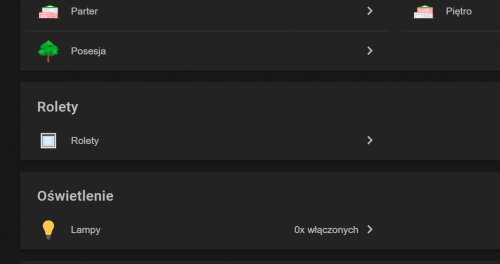
Mam zebrane w grupie te rolety tylko nie wiem jak sformułować aby sterować całą grupą abym miał (ikonkę rolety "Sterowanie roletami"   "wartość zamknięcia" i "przyciski sterujące") coś na wzór jak wygląda to dla item dla pojedyńczej rolety:

Wycinek sitemapy wygląda tak:

i chciałbym poniżej wejścia w grupę rolety aby było "Sterowanie roletami" z przyciskami. 

Dodaje wycinki z plików bo tylko przy takich parametrach OH zacząć działać mi z Shelly 2,5

Wycinek sitemapy

Frame label="Rolety" {
Group item=gShelly label="Rolety" icon="blinds"{
Default item=Roleta_shelly01 valuecolor=[>=80="#800000",>=60="#ffa500",>=40="#ffff00",>=20="#00ff00",>=0="#008000"]
Default item=Roleta_shelly02 valuecolor=[>=80="#800000",>=60="#ffa500",>=40="#ffff00",>=20="#00ff00",>=0="#008000"]
Default item=Roleta_shelly03 valuecolor=[>=80="#800000",>=60="#ffa500",>=40="#ffff00",>=20="#00ff00",>=0="#008000"]

Wycinek pliku thinks:

Thing topic Shelly25_xxxxxx "Roleta Kuchnia 1" @ "Kuchnia" {
Channels:
Type rollershutter : Shelly01 "Kuchnia roleta 1" [ stateTopic="shellies/shellyswitch25-xxxxxx/roller/0/pos", transformationPattern="JS:shellyRS.js"]
Type number : Shelly01pos "Kuchnia roleta 1 pozycja" [ commandTopic="shellies/shellyswitch25-xxxxxx/roller/0/command/pos"]
Type string : Shelly01cmd "Kuchnia roleta 1 komenda" [ commandTopic="shellies/shellyswitch25-xxxxxx/roller/0/command"]
}
Thing topic Shelly25_yyyyyy "Roleta Kuchnia 2" @ "Kuchnia" {
Channels:
Type rollershutter : Shelly02 "Kuchnia roleta 2" [ stateTopic="shellies/shellyswitch25-yyyyyy/roller/0/pos", transformationPattern="JS:shellyRS.js"]
Type number : Shelly02pos "Kuchnia roleta 2 pozycja" [ commandTopic="shellies/shellyswitch25-yyyyyy/roller/0/command/pos"]
Type string : Shelly02cmd "Kuchnia roleta 2 komenda" [ commandTopic="shellies/shellyswitch25-yyyyyy/roller/0/command"]
}
Thing topic Shelly25_zzzzzz "Roleta Salon 1" @ "Salon" {
Channels:
Type rollershutter : Shelly03 "Salon roleta 1" [ stateTopic="shellies/shellyswitch25-zzzzzz/roller/0/pos", transformationPattern="JS:shellyRS.js"]
Type number : Shelly03pos "Salon roleta 1 pozycja" [ commandTopic="shellies/shellyswitch25-zzzzzz/roller/0/command/pos"]
Type string : Shelly03cmd "Salon roleta 1 komenda" [ commandTopic="shellies/shellyswitch25-zzzzzz/roller/0/command"]
}

wycinek pliku items:

Group:Rollershutter:OR(UP, DOWN) gShelly "Rolety" <rollershutter> ["Rollershutter"]

Rollershutter Roleta_shelly01 "Kuchnia roleta 1[%s]" <blinds> (gShelly) { channel="mqtt:topic:newBroker:Shelly25_xxxxxx:Shelly01", autoupdate="false" }
Number Roleta_shelly01pos "Kuchnia roleta 1 pozycja" { channel="mqtt:topic:newBroker:Shelly25_xxxxxx:Shelly01pos" }
String Roleta_shelly01cmd "Kuchnia roleta 1 komenda" { channel="mqtt:topic:newBroker:Shelly25_xxxxxx:Shelly01cmd" }

Rollershutter Roleta_shelly02 "Kuchnia roleta 2[%s]" <blinds> (gShelly) { channel="mqtt:topic:newBroker:Shelly25_yyyyyy:Shelly02", autoupdate="false" }
Number Roleta_shelly02pos "Kuchnia roleta 2 pozycja" { channel="mqtt:topic:newBroker:Shelly25_yyyyyy:Shelly02pos" }
String Roleta_shelly02cmd "Kuchnia roleta 2 komenda" { channel="mqtt:topic:newBroker:Shelly25_yyyyyy:Shelly02cmd" }

Rollershutter Roleta_shelly03 "Salon roleta 1[%s]" <blinds> (gShelly) { channel="mqtt:topic:newBroker:Shelly25_zzzzzz:Shelly03", autoupdate="false" }
Number Roleta_shelly03pos "Salon roleta 1 pozycja" { channel="mqtt:topic:newBroker:Shelly25_zzzzzz:Shelly03pos" }
String Roleta_shelly03cmd "Salon roleta 1 komenda" { channel="mqtt:topic:newBroker:Shelly25_zzzzzz:Shelly03cmd" }

wycinek pliku rules:

rule "Kuchnia roleta 1 command"
when
Item Roleta_shelly01 received command
then
switch (receivedCommand) {
case UP :
Roleta_shelly01cmd.sendCommand("open")
case STOP :
Roleta_shelly01cmd.sendCommand("stop")
case DOWN :
Roleta_shelly01cmd.sendCommand("close")
}
end
rule "Kuchnia roleta 2 command"
when
Item Roleta_shelly02 received command
then
switch (receivedCommand) {
case UP :
Roleta_shelly02cmd.sendCommand("open")
case STOP :
Roleta_shelly02cmd.sendCommand("stop")
case DOWN :
Roleta_shelly02cmd.sendCommand("close")
}
end

 
Dodane : 06/11/2019 12:55 am
(@johny-mielony)
Wpisów: 4
Świeżak
Translate
English
Spanish
French
German
Italian
Portuguese
Russian
Chinese
Japanese
Korean
Arabic
Hindi
Dutch
Polish
Turkish
Vietnamese
Thai
Swedish
Danish
Finnish
Norwegian
Czech
Hungarian
Romanian
Greek
Hebrew
Indonesian
Malay
Ukrainian
Bulgarian
Croatian
Slovak
Slovenian
Serbian
Lithuanian
Latvian
Estonian
 

@laren0

Strasznie masz to namieszane. Dlatego nie lubię bindingu w wersji 2.x.
Ale po kolei. W sitemapie, jak na swoim przykładzie widzisz, elementy typu grupy łączy w jeden blok. Z dokumentacji: "Concentrates all elements of a given group in a nested block."
By móc wydać polecenie grupie musisz jej przypisać typ.
Czyli zrobić coś w tym rodzaju:
Sitemap:

Frame label="Rolety" {
Group item=gShelly label="Rolety" icon="blinds"{
Default item=Roleta_shelly01 valuecolor=[>=80="#800000",>=60="#ffa500",>=40="#ffff00",>=20="#00ff00",>=0="#008000"]
Default item=Roleta_shelly02 valuecolor=[>=80="#800000",>=60="#ffa500",>=40="#ffff00",>=20="#00ff00",>=0="#008000"]
Default item=Roleta_shelly03 valuecolor=[>=80="#800000",>=60="#ffa500",>=40="#ffff00",>=20="#00ff00",>=0="#008000"]
}
Switch item=gShellyCmnd label="Rolety" icon="blinds"
}

Items:

Group:Rollershutter:OR(UP, DOWN) gShelly "Rolety" <rollershutter>
Group:Rollershutter gShellyCmnd "Rolety" <rollershutter>

Rollershutter Roleta_shelly01 "Kuchnia roleta 1[%s]" <blinds> (gShelly) { channel="mqtt:topic:newBroker:Shelly25_xxxxxx:Shelly01", autoupdate="false" }
Number Roleta_shelly01pos "Kuchnia roleta 1 pozycja" { channel="mqtt:topic:newBroker:Shelly25_xxxxxx:Shelly01pos" }
String Roleta_shelly01cmd "Kuchnia roleta 1 komenda" (gShellyCmnd) { channel="mqtt:topic:newBroker:Shelly25_xxxxxx:Shelly01cmd" }

Rollershutter Roleta_shelly02 "Kuchnia roleta 2[%s]" <blinds> (gShelly) { channel="mqtt:topic:newBroker:Shelly25_yyyyyy:Shelly02", autoupdate="false" }
Number Roleta_shelly02pos "Kuchnia roleta 2 pozycja" { channel="mqtt:topic:newBroker:Shelly25_yyyyyy:Shelly02pos" }
String Roleta_shelly02cmd "Kuchnia roleta 2 komenda" (gShellyCmnd) { channel="mqtt:topic:newBroker:Shelly25_yyyyyy:Shelly02cmd" }

Rollershutter Roleta_shelly03 "Salon roleta 1[%s]" <blinds> (gShelly) { channel="mqtt:topic:newBroker:Shelly25_zzzzzz:Shelly03", autoupdate="false" }
Number Roleta_shelly03pos "Salon roleta 1 pozycja" { channel="mqtt:topic:newBroker:Shelly25_zzzzzz:Shelly03pos" }
String Roleta_shelly03cmd "Salon roleta 1 komenda" (gShellyCmnd) { channel="mqtt:topic:newBroker:Shelly25_zzzzzz:Shelly03cmd" }

[Rollershutter] na końcu definicji grupy nie powinno być.
Podkreśliłem miejsca na które warto zwrócić uwagę.
Można też grupować grupy i zrobić coś tego typu:
Items:

Group:Rollershutter:OR(UP, DOWN) gShelly "Rolety" <rollershutter>
Group:Rollershutter gShellyCmnd "Rolety" <rollershutter> (gShelly)
Group:Rollershutter gShellyKuchnia "Rolety kuchnia" <rollershutter> (gShellyCmnd)
Group:Rollershutter gShellySalon "Rolety salon" <rollershutter> (gShellyCmnd)

Rollershutter Roleta_shelly01 "Kuchnia roleta 1[%s]" <blinds> (gShelly) { channel="mqtt:topic:newBroker:Shelly25_xxxxxx:Shelly01", autoupdate="false" }
Number Roleta_shelly01pos "Kuchnia roleta 1 pozycja" { channel="mqtt:topic:newBroker:Shelly25_xxxxxx:Shelly01pos" }
String Roleta_shelly01cmd "Kuchnia roleta 1 komenda" (gShellyKuchnia) { channel="mqtt:topic:newBroker:Shelly25_xxxxxx:Shelly01cmd" }

Rollershutter Roleta_shelly02 "Kuchnia roleta 2[%s]" <blinds> (gShelly) { channel="mqtt:topic:newBroker:Shelly25_yyyyyy:Shelly02", autoupdate="false" }
Number Roleta_shelly02pos "Kuchnia roleta 2 pozycja" { channel="mqtt:topic:newBroker:Shelly25_yyyyyy:Shelly02pos" }
String Roleta_shelly02cmd "Kuchnia roleta 2 komenda" (gShellyKuchnia) { channel="mqtt:topic:newBroker:Shelly25_yyyyyy:Shelly02cmd" }

Rollershutter Roleta_shelly03 "Salon roleta 1[%s]" <blinds> (gShelly) { channel="mqtt:topic:newBroker:Shelly25_zzzzzz:Shelly03", autoupdate="false" }
Number Roleta_shelly03pos "Salon roleta 1 pozycja" { channel="mqtt:topic:newBroker:Shelly25_zzzzzz:Shelly03pos" }
String Roleta_shelly03cmd "Salon roleta 1 komenda" (gShellySalon) { channel="mqtt:topic:newBroker:Shelly25_zzzzzz:Shelly03cmd" }

Sitemap:

Frame label="Rolety" {
Group item=gShelly label="Rolety" icon="blinds"{
Default item=Roleta_shelly01 valuecolor=[>=80="#800000",>=60="#ffa500",>=40="#ffff00",>=20="#00ff00",>=0="#008000"]
Default item=Roleta_shelly02 valuecolor=[>=80="#800000",>=60="#ffa500",>=40="#ffff00",>=20="#00ff00",>=0="#008000"]
Default item=Roleta_shelly03 valuecolor=[>=80="#800000",>=60="#ffa500",>=40="#ffff00",>=20="#00ff00",>=0="#008000"]
}
Switch item=gShellyCmnd label="Rolety" icon="blinds"
Switch item=gShellyKuchnia label="Rolety kuchnia" icon="blinds"
Switch item=gShellySalon label="Rolety salon" icon="blinds"
}

Wtedy wydając polecenie grupie gShellyCmnd wydamy jednocześnie polecenie grupom gShellyKuchnia i gShellySalon, a te grupy wydadzą polecenia elementom które zawierają.
Można w ten sposób tworzyć całe drzewa. W jednej grupie obok siebie mogą być inne grupy jak i elementy.

Polecam czytać dokumentację.


Dodane : 06/11/2019 12:47 pm

Strona 3 / 3
Udostępnij: